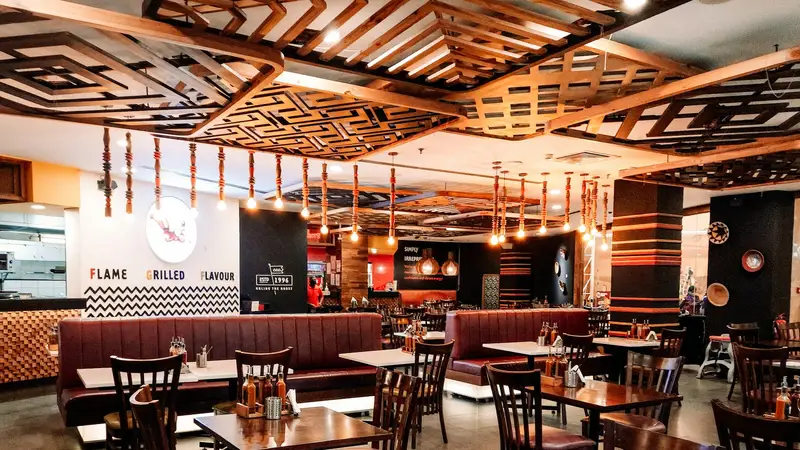
Shop billing guide
Hinglish me padho →Restaurant and Cafe Billing: Orders, a KOT for the Kitchen, and Stock by Recipe
A table of six, a kitchen that needs the order now, and a bill that must be right the moment they ask for it — while the next table waits.
- Free plan to start
- Works without internet
- 10,000+ bills made on Bilzy
Photo: Prithiviraj A · Unsplash
The short answer
A small restaurant or cafe needs to take an order, give the kitchen a ticket it can read, and print a bill on a thermal roll. On the Bilzy Android app, switch on Restaurant and the billing screen sends an order to the kitchen with its table number and prints a KOT; when the customer is done the order becomes the bill, and each dish’s recipe takes its ingredients off stock. Bills print on 58 mm or 80 mm thermal printers or go on WhatsApp. For most standalone restaurants GST is 5%. Bilzy runs on Android and Windows from ₹999 a year.
Staff work under their own logins, and the day book shows the day’s cash and UPI when you close.
- Kitchen
- KOT printed from the order
- Stock
- By recipe
- Bills
- Thermal 58 / 80 mm
- GST
- 5% for most restaurants
Good food brings them in. A quick, right bill brings them back.
The kitchen should never have to guess what the table ordered.
Every plate that leaves the kitchen should leave a trace in stock.
From order to bill
- 1
Order taken
Dishes sent to the kitchen with the table number.
- 2
KOT printed
The kitchen gets its ticket.
- 3
Served
Ingredients leave stock by recipe.
- 4
Billed
The order becomes the bill — nothing typed twice.
- 5
Paid
Cash, UPI or both; the bill printed or sent.
How to run restaurant billing on the Bilzy app
- 1
Switch on restaurant mode
In Settings, open Business Profile and switch on Restaurant. It comes with the paid plan.
- 2
Add your menu
Add each dish with its price and GST rate. Short names make dishes quick to find at a busy counter.
- 3
Give dishes their recipes
For the dishes you want to track, set the recipe — rice, paneer, oil — so billing the dish takes them off stock.
- 4
Send the order to the kitchen
Add the dishes on the billing screen and send them to the kitchen with the table number, or “Parcel” for takeaway. The KOT prints for the kitchen and can be reprinted if it gets lost.
- 5
Bill the order
When the customer is done, open the order and turn it into the bill.
- 6
Take payment and print
Cash, UPI or both. Print on a 58 mm or 80 mm roll, or send the bill on WhatsApp.
- 7
Close the day
Read the day’s sales, cash and UPI, and match them with the drawer.
GST for restaurants
| Kind of restaurant | GST | Input tax credit |
|---|---|---|
| Standalone restaurant, cafe or dhaba — dine-in, takeaway or delivery | 5% | Not available |
| Restaurant in a hotel that charges more than ₹7,500 a night for a room | 18% | Available |
Rates as they stand after the GST Council changes that took effect on 22 September 2025. The rate follows the exact HSN code and, for some goods, the price — check yours on cbic-gst.gov.in before you bill. Confirm which one your restaurant is with your accountant.
A restaurant on Bilzy
Your restaurant on Bilzy
- Orders
- Table number or parcel
- KOT for the kitchen
- Reprint when needed
- Billing
- Order becomes the bill
- Cash, UPI or both
- Thermal or WhatsApp
- Kitchen
- Recipe for a dish
- Ingredients leave stock
- Low-stock list
- Buying
- Supplier bills
- Vegetables and dairy
- What you owe suppliers
- Staff
- A login for each
- Only screens you allow
- Salary and attendance
- Numbers
- Day book
- Sales reports
- GST worked out
The bill is the last thing a customer tastes. Make it quick, and make it right.
Small restaurant habits
A KOT for every order
A spoken order is forgotten. A printed one is cooked.
Recipes for the costly items first
Paneer, meat and ghee are where stock goes missing. Track those before anything else.
Supplier bills every day
Vegetables and dairy arrive every day. Enter them every day.
Close the drawer nightly
Match cash and UPI before the staff leave for the night.
Short names for dishes
Two letters should find any dish when the counter is full.
What it costs to start, side by side
Listed prices for one counter, read off each seller's own page or the marketplace that sells it. Compare what you get for the money, on your own counter.
| Software | Plan | Listed price | Where it is listed |
|---|---|---|---|
| Bilzy | Windows counter, every feature | ₹999 a year · phone + Windows ₹1,299 a year · free plan to start | bilzy.in |
| Vyapar | Desktop plan | about ₹3,400 a year; mobile app free to download | techjockey.com listing |
| Zoho Books | Standard (3 users) | ₹749 a month, billed yearly; free plan up to ₹25 lakh revenue | zoho.com |
| TallyPrime | Silver (single user) | ₹22,500 + GST one-time, then about ₹4,500 a year for TSS; or ₹750 a month rental | erpresearch.com |
Prices as listed on 14 September 2026, before GST where the seller quotes them that way. They change — confirm on each seller's own site. Vyapar, Zoho Books, TallyPrime and Marg ERP are trademarks of their owners; Bilzy is not connected with them.
What Bilzy costs
One price with every feature on it. No per-bill charge, no AMC, no extra charge for staff logins.
Free
₹0to start
Try billing on your own counter first. No card.
Windows
₹999a year
Every feature on the counter PC. Or ₹99 a month.
Phone + Windows
₹1,299a year
One account on the counter PC and your phone.
Questions shopkeepers ask
What is the GST on restaurant food?
For a standalone restaurant, cafe or dhaba, GST is 5% without input tax credit, for dine-in, takeaway and delivery alike. A restaurant in a hotel that charges more than ₹7,500 a night for a room charges 18% with input tax credit. Confirm with your accountant.
Can Bilzy print a KOT?
Yes. On the Android app, switch on Restaurant in Business Profile. Send an order to the kitchen with its table number and a KOT prints, and it can be reprinted. When the customer is done, the order becomes the bill.
Can stock go down by recipe?
Yes. On the Android app, give a dish its recipe, and billing the dish takes those ingredients off stock.
Is Bilzy only for small shops?
No. It is priced so a small shop can afford it, and built for a busy one: staff logins with roles, stock in more than one godown, wholesale rates and credit limits, GSTR-1 and GSTR-3B files, and billing that keeps going when the internet does not. The low price is how it is sold — one yearly plan, bought online, with no AMC — not a smaller product.
Does Bilzy work without internet?
Yes. Bills are made and saved on the phone or the PC, and go up to your account when the connection comes back.
Can I use it on my phone and my computer together?
Yes, on one account. Items, parties and bills are the same on both, and stock is moved by the server so two counters cannot sell the same last piece. Phone + Windows is ₹1,299 a year.
Can my staff bill without seeing my profit?
Yes. Each staff login gets only the screens you tick. Purchase cost and profit are their own permission.
Make your next restaurant & cafe bill on Bilzy.
Install it on the counter PC or your phone and bill your first customer today. Help on the phone or WhatsApp: 9387029304.
Read next
Bakery & sweet shop
Bakery and Sweet Shop Billing: Sweets by Weight, Cake Orders and the Festival Rush
Half a kilo of kaju katli, a birthday cake for Saturday with ₹500 advance, and a Diwali queue out the door — all before lunch.
Dairy, fruit & vegetable shop
Dairy, Fruit and Vegetable Shop Billing: By Weight, on the Phone, With Monthly Accounts
Milk every morning to eighty homes, paneer by the gram, vegetables weighed in a hurry — and a month-end account every family wants to see.
Kirana store
How to Make a Bill in a Kirana Store — and the Software That Makes It Quick
Loose atta by the kilo, biscuits by barcode, a regular customer on udhaar — all on one bill, while the queue keeps moving.
Published 15 September 2026 by Bilzy. Cover photo by Prithiviraj A on Unsplash, used under the Unsplash licence; the people and places in it are not connected with Bilzy.